Best Software Skills to Learn for a Career in Civil Engineering in 2026
The civil engineering industry has changed significantly with the growth of
BIM, 3D modeling, digital construction, project management, and infrastructure technology.
Today, having a civil engineering degree alone may not be enough to stand out when applying for jobs.
Employers increasingly look for candidates who can use industry-standard software and understand how
these tools are applied to real construction projects.
If you are a civil engineering student, graduate, diploma holder, fresher, or someone planning to
enter the construction industry, learning the right software can significantly improve your employment
opportunities.
You do not need to learn every civil engineering software available.
Focus on AutoCAD + Excel first and then choose a specialization such as
BIM, Structural Engineering, Planning, Roads, or Quantity Surveying.
Why Software Skills Are Important in Civil Engineering
Modern construction projects involve thousands of drawings, calculations, schedules,
quantities, models, documents, and revisions. Software helps engineers manage these tasks
faster and with greater accuracy.
Software knowledge can help you with:
- Creating technical drawings
- Preparing building plans
- Structural analysis and design
- 3D building modeling
- Quantity estimation
- Preparing BOQs
- Construction planning
- Project scheduling
- Clash detection
- Road and infrastructure design
- Surveying and mapping
- Construction documentation
1. AutoCAD – The First Software Every Civil Engineer Should Learn
AutoCAD is one of the most important software skills for people starting
a career in civil engineering. It is widely used for creating accurate 2D technical drawings
and layouts.
What Can You Do With AutoCAD?
- Floor plans
- Elevation drawings
- Section drawings
- Site plans
- Structural drawings
- Road drawings
- Electrical and plumbing layouts
- Construction details
Jobs Where AutoCAD Is Useful
- CAD Draftsman
- Civil Draftsman
- Junior Civil Engineer
- Site Engineer
- Design Engineer
- Architectural Draftsman
If you are completely new to civil engineering software, AutoCAD should normally be
your starting point.
2. Microsoft Excel – A Surprisingly Important Skill
Many beginners focus only on engineering design software and underestimate Excel.
In reality, Excel is used extensively on construction projects.
Engineers may use Excel for:
- Quantity calculations
- Material tracking
- Cost calculations
- BOQ preparation
- Daily progress reports
- Labour tracking
- Material consumption
- Project reports
- Site measurements
- Data analysis
Excel Skills Worth Learning
- SUM and AVERAGE
- IF functions
- SUMIF and SUMIFS
- VLOOKUP / XLOOKUP
- Conditional formatting
- Data validation
- Pivot tables
- Charts
- Basic dashboards
A civil engineer who understands both engineering concepts and Excel-based
project documentation can be more useful on a construction site.
3. Revit – Learn BIM and 3D Building Modeling
Autodesk Revit is an important BIM (Building Information Modeling)
platform used for creating intelligent 3D building models.
Unlike traditional 2D drafting, BIM allows different building components and information
to be represented within a coordinated digital model.
Revit Can Be Used For
- 3D building modeling
- Architectural modeling
- Structural modeling
- Documentation
- Schedules
- Quantity information
- Building coordination
- BIM workflows
Possible Career Roles
- BIM Modeler
- BIM Engineer
- Revit Modeler
- Structural BIM Engineer
- BIM Coordinator
If you are interested in working with modern building projects, Revit is one of
the most valuable software skills to consider after AutoCAD.
4. Civil 3D – Useful for Roads, Land Development and Infrastructure
Autodesk Civil 3D is designed specifically for civil engineering,
surveying, land development, transportation, and infrastructure projects.
Applications of Civil 3D
- Road design
- Land development
- Surface modeling
- Grading
- Drainage design
- Corridor modeling
- Survey data management
- Profiles and alignments
Civil 3D is particularly useful if your career goal is roads, highways,
infrastructure, surveying, or land development.
5. STAAD.Pro – Structural Analysis and Design
Students interested in structural engineering should consider learning
STAAD.Pro.
Structural engineers use analysis and design software to study how structures respond
to loads and to assist with structural design.
Topics to Understand Alongside STAAD.Pro
- Structural loads
- Dead load and live load
- Load combinations
- Beams and columns
- Structural frames
- Foundations
- Reinforced concrete concepts
- Steel structures
Remember that learning the software interface is not enough. A structural engineer
must understand the engineering principles behind the analysis.
6. ETABS – Building Structural Analysis
ETABS is another widely recognized structural analysis and design
program, particularly suited to building structures.
It can be useful for working with:
- Multi-storey buildings
- Concrete structures
- Steel structures
- Structural frames
- Load analysis
- Building design workflows
If your goal is to become a structural design engineer, learning
ETABS together with structural engineering fundamentals can be valuable.
7. SAP2000 – Structural Analysis
SAP2000 is another structural analysis and design tool used for
different types of structures.
It can be particularly useful for engineers working with structures that go beyond
conventional building projects.
Students should focus on understanding structural modeling, loading, analysis,
interpretation of results, and design principles rather than simply learning where
to click in the software.
8. Primavera P6 – Important for Planning Engineers
Civil engineers who want to work in construction planning and project management
should consider learning Primavera P6.
Planning engineers may use project scheduling software to manage:
- Construction activities
- Project schedules
- Activity relationships
- Project milestones
- Resources
- Progress tracking
- Delays
- Project timelines
Who Should Learn Primavera?
- Planning Engineers
- Project Engineers
- Construction Engineers
- Project Managers
- Site Engineers interested in planning
9. Microsoft Project
Microsoft Project is another project management and scheduling
application that can be useful for construction professionals.
It can help engineers understand project schedules, task relationships, timelines,
resources, and progress.
If you are starting your project-management journey, learning basic scheduling concepts
before moving into advanced planning software is recommended.
10. Navisworks – BIM Coordination and Clash Detection
Navisworks is useful in BIM coordination and construction project
review workflows.
One of its important applications is identifying potential clashes between different
building systems before construction.
For example, a BIM coordination process may identify conflicts involving:
- Structural elements
- HVAC systems
- Plumbing
- Electrical systems
- Architectural components
This makes Navisworks a useful skill for people planning to build a career in
BIM coordination.
11. Tekla Structures – Structural Detailing
Tekla Structures is a specialized BIM and structural detailing
platform used for detailed structural modeling.
It can be relevant for professionals working with steel structures, reinforced concrete,
fabrication, detailing, and construction information.
Tekla can be especially valuable for people interested in becoming structural detailers
or working in BIM-based structural workflows.
12. SketchUp – 3D Visualization
SketchUp is a relatively accessible 3D modeling tool that can help
students understand basic 3D visualization.
It can be useful for:
- Conceptual models
- Building visualization
- Site concepts
- Presentation models
- Interior and exterior visualization
13. GIS – QGIS and ArcGIS
Civil engineers working in infrastructure, urban development, surveying, transportation,
environmental projects, and land management may benefit from GIS skills.
QGIS is an open-source GIS platform, while ArcGIS
is a widely used commercial GIS platform.
GIS can be used for:
- Mapping
- Land analysis
- Infrastructure mapping
- Transportation analysis
- Survey-related work
- Urban planning
- Geographical data visualization
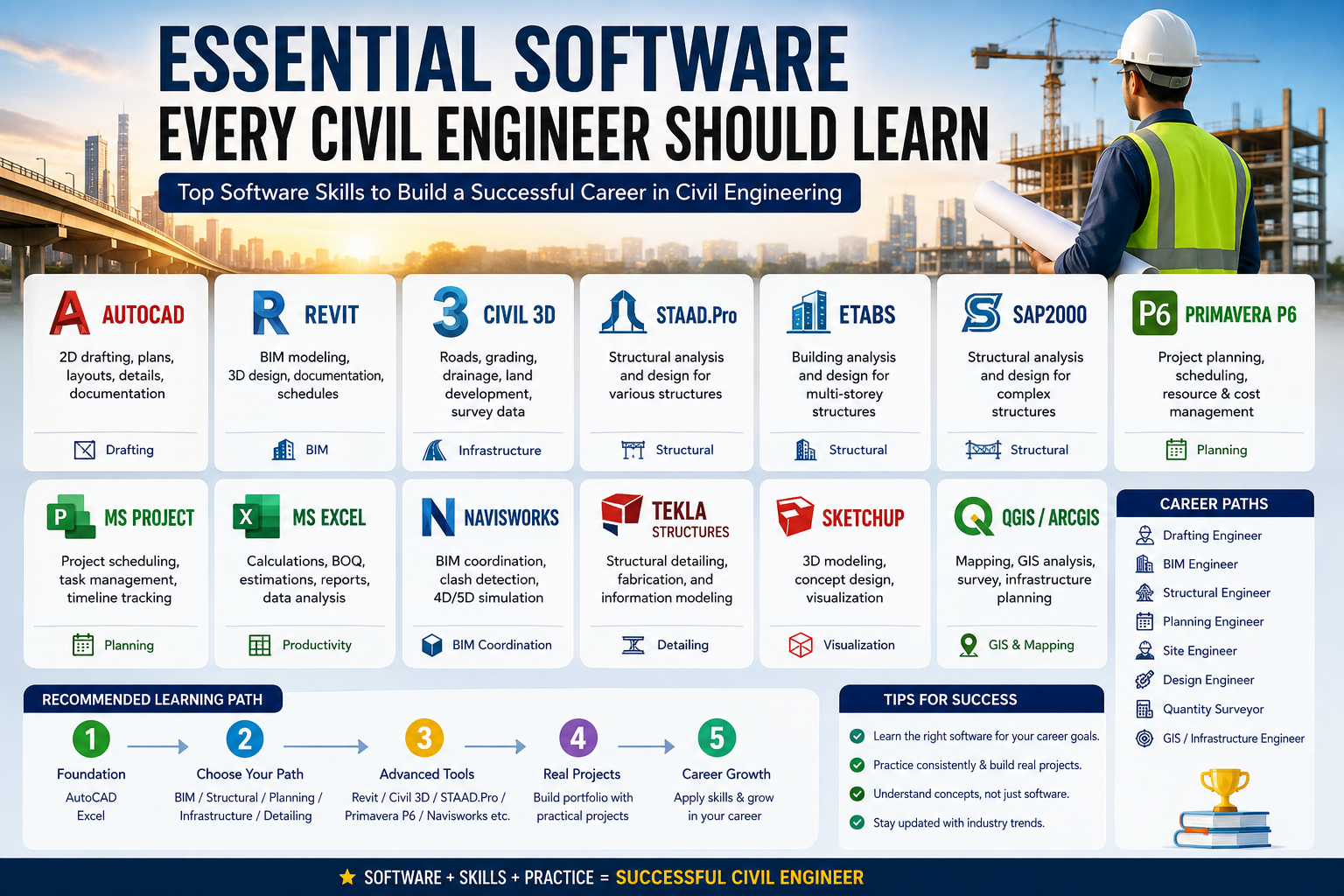
Which Software Should You Learn Based on Your Career Goal?
| Career Goal | Recommended Software |
|---|---|
| Civil Draftsman | AutoCAD + Excel |
| Site Engineer | AutoCAD + Excel + Revit |
| Structural Engineer | AutoCAD + STAAD.Pro + ETABS |
| BIM Engineer | Revit + Navisworks + AutoCAD |
| Planning Engineer | Primavera P6 + Excel + MS Project |
| Road Engineer | Civil 3D + AutoCAD + GIS |
| Structural Detailer | Tekla + AutoCAD |
| Quantity Surveyor | Excel + AutoCAD + Quantity Takeoff Tools |
| Infrastructure / GIS | Civil 3D + QGIS / ArcGIS |
The Best Learning Path for a Civil Engineering Fresher
If you are a fresher and don’t know where to start, don’t try to learn everything
simultaneously. A structured approach is much more effective.
Stage 1 – Build the Foundation
- AutoCAD
- Microsoft Excel
- Basic construction drawings
- Quantity calculations
- Basic estimation concepts
Stage 2 – Choose Your Specialization
Choose one of the following:
- BIM: Revit + Navisworks
- Structural: STAAD.Pro + ETABS
- Planning: Primavera P6 + Excel
- Roads: Civil 3D + GIS
- Structural Detailing: Tekla + AutoCAD
Stage 3 – Build Real Projects
One of the biggest mistakes beginners make is collecting software certificates
without creating practical projects.
Instead, create sample projects such as:
- A residential building plan in AutoCAD
- A small building model in Revit
- A sample structural model
- A road design project using Civil 3D
- A construction schedule using Primavera
- A quantity and estimation workbook in Excel
Certificates vs Practical Skills
Certificates can be useful, but employers generally need to know whether you can actually
perform the work.
For example, instead of simply saying “I know AutoCAD”, your portfolio
can demonstrate that you can create a floor plan, elevation, section, dimensions,
annotations, layers, and construction details.
A small portfolio can therefore make your resume much stronger, particularly when
applying for entry-level positions.
Soft Skills Civil Engineers Should Also Develop
Software is only one part of becoming employable. Construction is a team-oriented
industry, so communication and practical understanding are also important.
- Communication skills
- Technical drawing reading
- Problem-solving
- Teamwork
- Time management
- Report writing
- Site coordination
- Basic construction knowledge
- Understanding of safety procedures
Final Recommendation
If your main goal is to get your first job in the civil engineering or construction
industry, don’t become overwhelmed by the number of software packages available.
Start with:
Recommended Beginner Roadmap
AutoCAD → Excel → Revit/Civil 3D → Choose a Specialization → Build Projects → Apply for Jobs
For structural engineering, move toward STAAD.Pro and ETABS.
For BIM, focus on Revit and Navisworks.
For construction planning, learn Primavera P6 and Excel.
For roads and infrastructure, consider Civil 3D and GIS.
Most importantly, combine software knowledge with real civil engineering fundamentals.
Software is a tool—the ability to understand drawings, structures, materials,
construction methods, quantities, schedules, and site conditions is what turns that
software knowledge into a career.
If you are a fresher, choose 2–3 relevant software tools, become genuinely comfortable
using them, and create a small portfolio of practical projects. This is generally more
useful than trying to list every software name on your resume.